Testing Misterly for a Modern Website Design
I was working on a redesign for a boutique online store selling handcrafted jewelry, and I needed a font that felt both elegant and approachable. The brand wanted something unique but not too over the top—something that would stand out in the hero section but still be easy to read. That’s when I came across Misterly, a handwritten font from Script Amp that immediately caught my eye.
What Is Misterly?
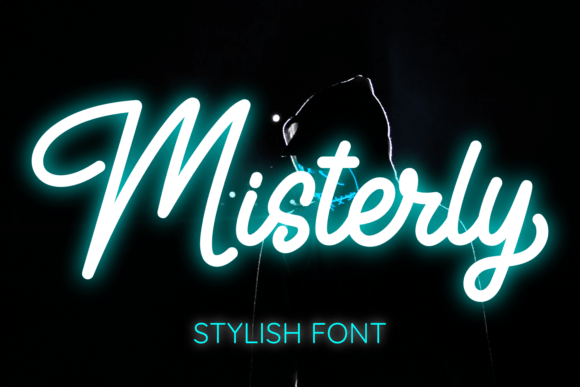
Misterly is a premium script font with a modern twist. It has all the charm of traditional calligraphy but feels fresh and contemporary. The strokes are clean, the curves are smooth, and it gives off a sense of sophistication without being too formal. It’s one of those fonts that you can see yourself using in a variety of digital contexts—from website headers to social media graphics.
As a designer, I always look for fonts that can adapt to different layouts while maintaining their character. Misterly did exactly that. It wasn’t just a decorative element; it had personality and purpose.
Using Misterly in a Real Web Project
I started by testing Misterly in the hero section of the jewelry site. The headline was “Handmade with Love,” and I wanted it to feel warm and inviting. When I applied Misterly, it instantly gave the page a more personal touch. The contrast between the soft, flowing letters and the crisp product images worked really well.
Next, I tried it on a few section headings. It looked great as a title for the “Our Story” section, where the brand shared its journey. The font helped reinforce the idea of craftsmanship and care behind each piece. But I also noticed that it didn’t work as well for long paragraphs or body text. That made sense—script fonts are best used sparingly and for emphasis.
I tested it on mobile screens too. While Misterly looked fantastic on desktop, I had to adjust the size and spacing slightly for smaller screens. On mobile, I paired it with a clean sans serif font for the supporting text to ensure readability. This kind of font pairing is essential for responsive design.
Where Can You Use Misterly?
Misterly is ideal for short phrases, headlines, and decorative accents. Here are some realistic examples of where it could shine:
- Hero Sections: For bold, attention-grabbing headlines that reflect the brand’s personality.
- Call-to-Action Buttons: If the button text is short, like “Shop Now” or “Learn More,” Misterly can add a stylish edge.
- Logo Text: It works especially well for logos that want to convey creativity, elegance, or a personal touch.
- Boutique Online Stores: Perfect for branding, product titles, or promotional banners.
- Coaching Websites: Great for headlines that emphasize guidance, inspiration, or transformation.
- Portfolio Sites: Ideal for showcasing creative work with a polished yet approachable aesthetic.
It’s important to remember that Misterly isn’t meant to replace your primary body font. Instead, think of it as an accent—something that adds visual interest without compromising usability.
Readability and User Experience
One thing I always check when choosing a font is how it affects scanning behavior. Users tend to skim through web content, so legibility is key. Misterly performed well in this regard when used for short, impactful phrases. However, I avoided using it for longer sections of text to prevent fatigue or confusion.
On dark backgrounds, I found that Misterly still maintained good contrast, especially when paired with a light color. But I made sure to test it against various background colors and image overlays to ensure it remained readable in every context.
Another consideration was loading speed. Since Misterly is available as a webfont, I used a font loader to optimize performance. It’s crucial to balance aesthetics with technical efficiency, especially for high-traffic sites.
Font Pairing Tips
When using Misterly, I paired it with a simple sans serif font like Open Sans or Lato for body copy. This combination created a nice contrast—modern yet elegant. It also helped maintain a clear visual hierarchy, which is essential for user engagement.
If the brand identity leans more towards editorial or professional design, a serif font might be a better match for body text. But if the goal is to create a more casual, creative vibe, a sans serif font will do the trick.
Final Notes on Using Misterly
Before implementing Misterly on a live site, I checked the included styles, weights, and multilingual support. It had enough variations to suit different needs, and the commercial license made it suitable for client projects and online stores.
Overall, Misterly added a refined, personalized touch to the website. It helped elevate the brand’s visual identity and made the content feel more engaging. As a designer, I appreciate fonts that offer both style and substance, and Misterly definitely fits that bill.