Button Flutter: A Friendly Handwritten Font for Creative Projects
There’s something comforting about starting a new brand board with a blank canvas. I recently found myself in that familiar position, tasked with designing a visual identity for a boutique handmade soap brand. The challenge was to create a look that felt warm, approachable, and authentic—something that would resonate with eco-conscious customers who value craftsmanship. That’s when I stumbled upon Button Flutter, a simple and friendly handwritten font from Script Amp.
A Warm Welcome to Button Flutter
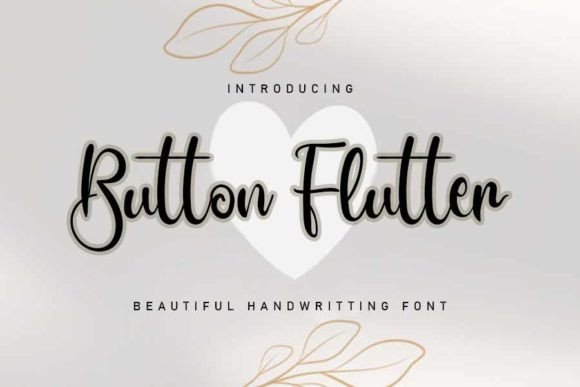
Button Flutter immediately caught my eye with its soft curves and gentle strokes. It feels like the kind of handwriting you’d find on a note tucked into a gift box or a personal letter. This is no rigid, corporate typeface—it's all about warmth, character, and charm. Its personality is playful yet professional, making it ideal for projects that need a human touch without sacrificing style.
I tested it out on a logo concept for the soap brand, pairing it with a clean sans serif font for balance. The result was inviting and cohesive, with the handwritten feel adding a sense of authenticity that stood out against more formal typography. It worked especially well on the product label mockup, where the name of the soap needed to feel personal and artisanal.
Button Flutter in Real-World Branding Scenarios
One of the first things I noticed about Button Flutter is how versatile it is across different design applications. In the logo draft, it gave the brand an immediate sense of friendliness. When I used it on the packaging mockup, it felt natural and not forced, blending seamlessly with the illustrations and textures I added to the design.
On the business card, I paired it with a minimalist sans serif for body text. The contrast between the two fonts created a nice visual hierarchy while keeping the overall look modern and readable. For the website header, I used it as a headline font, and it looked great in both light and dark mode variations.
In social media layouts, Button Flutter added a touch of personality to promotional posts and captions. It didn’t overpower the content but instead helped draw attention to key messages. Even on Instagram, where brevity is key, it felt just right—elegant enough to be professional, yet casual enough to be relatable.
When to Use (and When Not to Use) Button Flutter
While Button Flutter excels in display and headline use, it’s not the best choice for long-form body text. The handwritten nature of the font can make it less legible at smaller sizes or over extended passages. That said, it shines in short phrases, taglines, logos, and accents that need a personal flair.
It’s also worth noting that this font may not be suitable for highly formal or corporate branding. If your project requires strict professionalism or a very structured visual language, a more traditional serif or sans serif might be a better fit. However, for creative studios, small businesses, and independent creators looking to add a unique voice to their brand, Button Flutter is a solid choice.
Font Pairing and Practical Considerations
For a balanced look, I recommend pairing Button Flutter with a complementary sans serif or serif font. In the soap brand example, I used a modern sans serif for body copy, which provided the necessary contrast and readability. For a more elegant look, a delicate serif could work well too.
Before using Button Flutter in final client work, it’s always a good idea to test it in various contexts. Try it out on different backgrounds, sizes, and color schemes to ensure it performs well across all platforms. Also, remember to check the commercial font licensing if you plan to use it in client work, brand identity, templates, merchandise, websites, or print-on-demand products.
The font comes with a range of styles and alternates, allowing for subtle customization. While it doesn’t include swashes or ligatures, the simplicity of its design makes it easy to integrate into most design systems without needing complex typographic features.
Whether you're working on a greeting card, a product label, or a digital presentation, Button Flutter brings a level of warmth and personality that’s hard to achieve with other fonts. It’s a premium font that feels handcrafted, making it perfect for any project that needs a personal touch.